
Let every shopper try on every frame — through one API call.
LayerFrames is a proprietary AI rendering API that places any glasses or sunglasses frame on any face, photorealistically. Eyewear brands integrate it into an existing product catalog or storefront in a single afternoon.
No native app. No 3D team. Works on the phone your customer already has.

+34%
Add-to-cart lift on frames with try-on enabled
−28%
Fewer size/style returns per 1,000 orders
820ms
Median render time, p50, cached frame asset
1 day
Typical time from API key to live storefront
Returns are eating your margin. Try-on is the cheapest fix.
Roughly 3 in 10 online eyewear orders come back — wrong size, wrong shape, wrong vibe. Every return costs you shipping both ways, restocking, and a customer who may not come back.
Fewer returns
Shoppers see the frame on their own face before checkout, so 'it didn't suit me' returns drop sharply. Partners report a 22–31% reduction in style-related returns.
More conversion
Try-on sessions convert 2–3× better than plain product views. Shoppers who try 3+ frames add to cart at the highest rate in your catalog.
Lower build cost
Building this in-house means a CV team, 3D asset pipeline, and mobile SDKs — six figures and 9+ months. LayerFrames is a line of JavaScript.
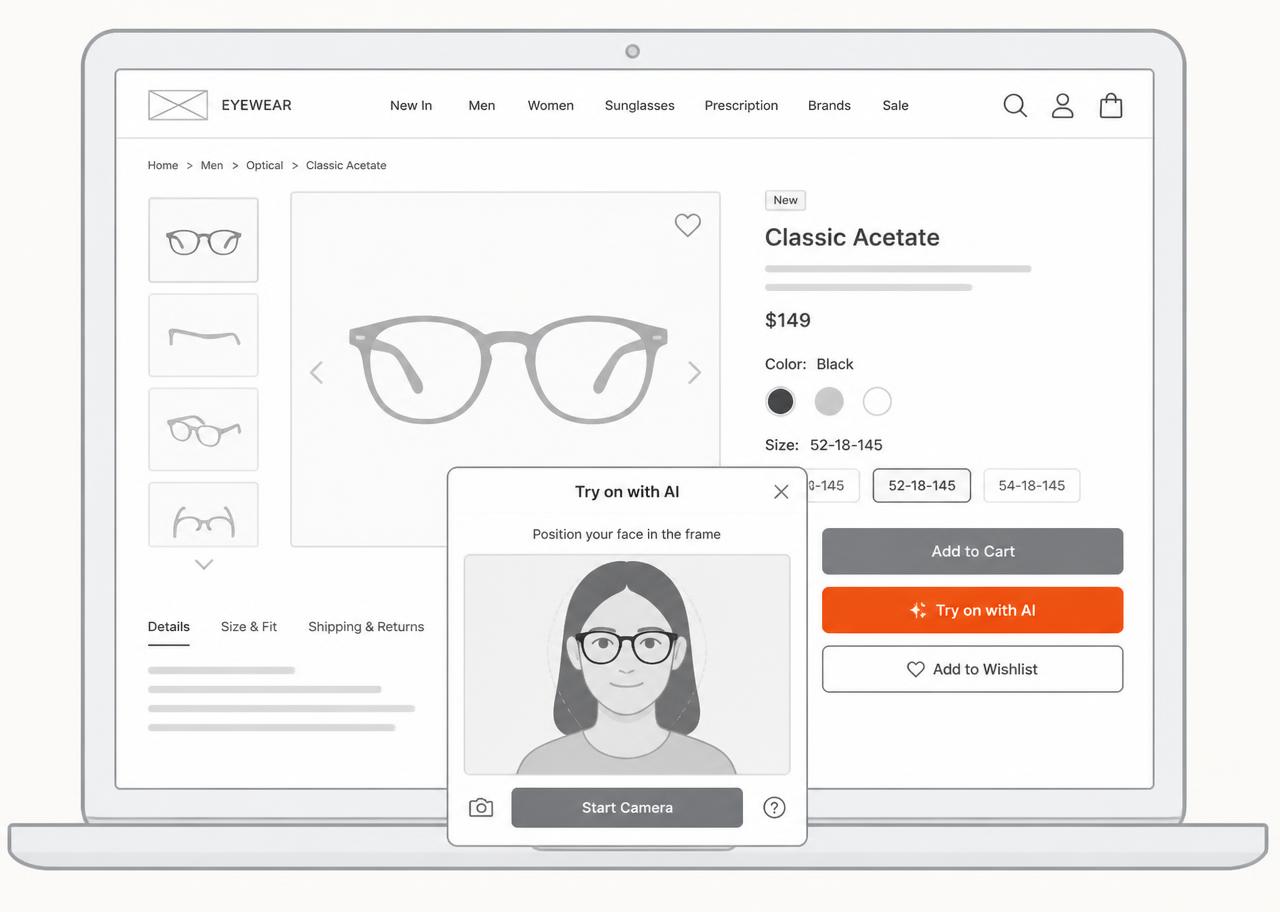
This is what your product page looks like on day two.
A low-fidelity view of a typical eyewear PDP with LayerFrames installed. One extra button, one modal, everything else stays exactly as your team built it.
- Try-on button inherits your CSS — colors, radius, typography.
- Modal opens with camera or photo upload; no app install prompt.
- Frame swapping is instant: switch SKU or colorway without re-rendering the face.
- Falls back to a static rendered image where camera access is blocked.
A complete try-on stack, not just an image filter.
LayerFrames handles catalog ingestion, face understanding, rendering, fit measurement, and analytics. You handle the storefront.
Photoreal frame rendering
Upload a selfie or stream a webcam frame. Our model detects 68 facial landmarks, estimates head pose in 3 axes, and composites the frame with correct scale, occlusion, shadow, and lens tint.
Your catalog, ingested once
Send product images or CAD/GLB assets to /frames. We build a try-on-ready asset per SKU with hinge geometry, temple length, bridge width, and colorway variants.
Fit intelligence
Every render returns measured pupillary distance, face width, and a fit score per SKU, so you can surface 'fits you' badges and personalized recommendations.
Live video mode
A WebSocket session streams 24–30 fps try-on directly in the browser. No app install, no native SDK, works on iOS Safari and Android Chrome.
Privacy by default
Selfies are processed in-memory and discarded within 60 seconds unless you explicitly opt into storage. GDPR and CCPA ready, with a signed DPA.
Drop-in or headless
Use the 12 kB embed script for a one-line install, the React component, or call the raw REST API and render try-on wherever you want.
Your first render, in about four minutes.
Authenticate with a bearer key, reference a frame you've synced, and pass a subject image. You get back a hosted render plus fit measurements.
curl https://api.layerframes.com/v1/tryon \
  -H "Authorization: Bearer lf_live_..." \
  -H "Content-Type: application/json" \
  -d '{
    "frame_id": "frm_classic_acetate_black",
    "subject": { "image_url": "https://cdn.yourstore.com/u/9f2.jpg" },
    "options": { "lens_tint": "auto", "output": "png", "size": "1024x1024" }
}'{
"id": "try_8Kd21mQz",
"status": "succeeded",
"render_url": "https://cdn.layerframes.com/r/8Kd21mQz.png",
"latency_ms": 812,
"fit": { "score": 0.91, "pupillary_distance_mm": 63.4, "face_width_mm": 141.2 },
"frame": { "id": "frm_classic_acetate_black", "colorway": "black" }
}Three steps to live.
Sync your catalog
POST each SKU to /v1/frames, or point us at a Shopify / BigCommerce / custom feed. We normalize measurements and generate try-on assets automatically.
Add try-on to the PDP
Drop in <script src="https://cdn.layerframes.com/embed.js"> and a data-frame-id attribute on your button. Or call the API yourself for a fully custom UI.
Measure and optimize
Every session emits events: try_on_started, frame_swapped, added_to_cart. Pipe them into your analytics and see try-on driven revenue per SKU.
See LayerFrames running on your own catalog.
Send us 10 SKUs before the call. We'll render them live on the demo and hand you a sandbox key at the end.
Schedule a call